Marketing Automation in Education: Streamline your processes
Marketing Automation in Education: Streamline your processes
April 13th, 2025
5 min read
Within the education sector, there’s often a wide range of marketing activities happening. Manually managing all of these is time-consuming and takes up valuable resources that could be better used elsewhere. However, with the right education CRM software in place, organisations can automate many marketing tasks, increasing efficiency and productivity as a result.
Dynamics 365 Customer Insights – Journeys is a comprehensive marketing solution that can easily manage all marketing efforts across an organisation. In this blog, we explore the automation possibilities this solution offers:
- Automate audience segmentation
- Automate email marketing
- Automate customer journeys
- Automate reporting
What automation capabilities are available in Dynamics 365 for your Education provider?
Audience segmentation
Correctly targeted marketing communications can be the difference between engaging successfully with your audience and missing the mark. With Dynamics 365 Marketing, a common method to ensure accurate targeting is to define clear contact groups and keep them up to date. These groups, often called marketing segments, are key to maintaining relationships and nurturing leads in Dynamics 365 Marketing.
In education, segments might include current students, students who joined within the last year, donors who have shown interest, and more. The number of groups can be large, and manually tracking these is difficult and time-consuming. This increases the risk of misallocating contacts or missing opportunities, resulting in less effective engagement.
How can marketing lists be automated?
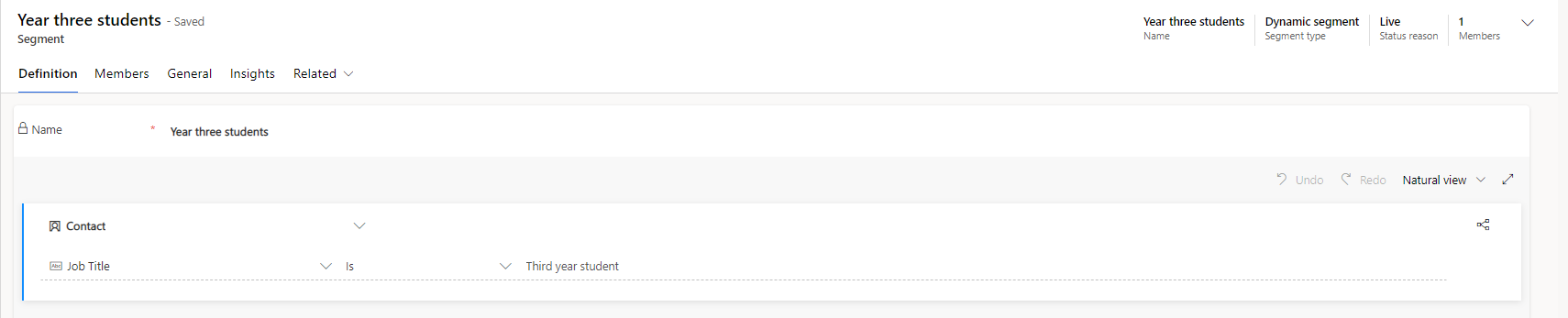
Dynamic segments within D365 Marketing allow you to create, manage, and automatically update audiences. By defining criteria in advance, segments update themselves based on current data.
For example, you could create a dynamic segment for students who joined in the last four weeks. New students who meet this will be added automatically, and students enrolled for longer than four weeks will be removed.
By using this, organisations avoid time-consuming manual processes and ensure communications reach the most relevant audience.
Email Marketing
Email plays a vital role in keeping stakeholders engaged. It can help attract and retain students, share important updates, and much more.
However, as organisations grow, managing high volumes of emails becomes complex.
How can email marketing be automated?
Automation simplifies managing large volumes of email communications. Dynamics 365 Marketing offers features to assist with this:
- Sending Emails: Regular mass communications for new courses, onboarding, course completions, and more can be automated, saving significant time.
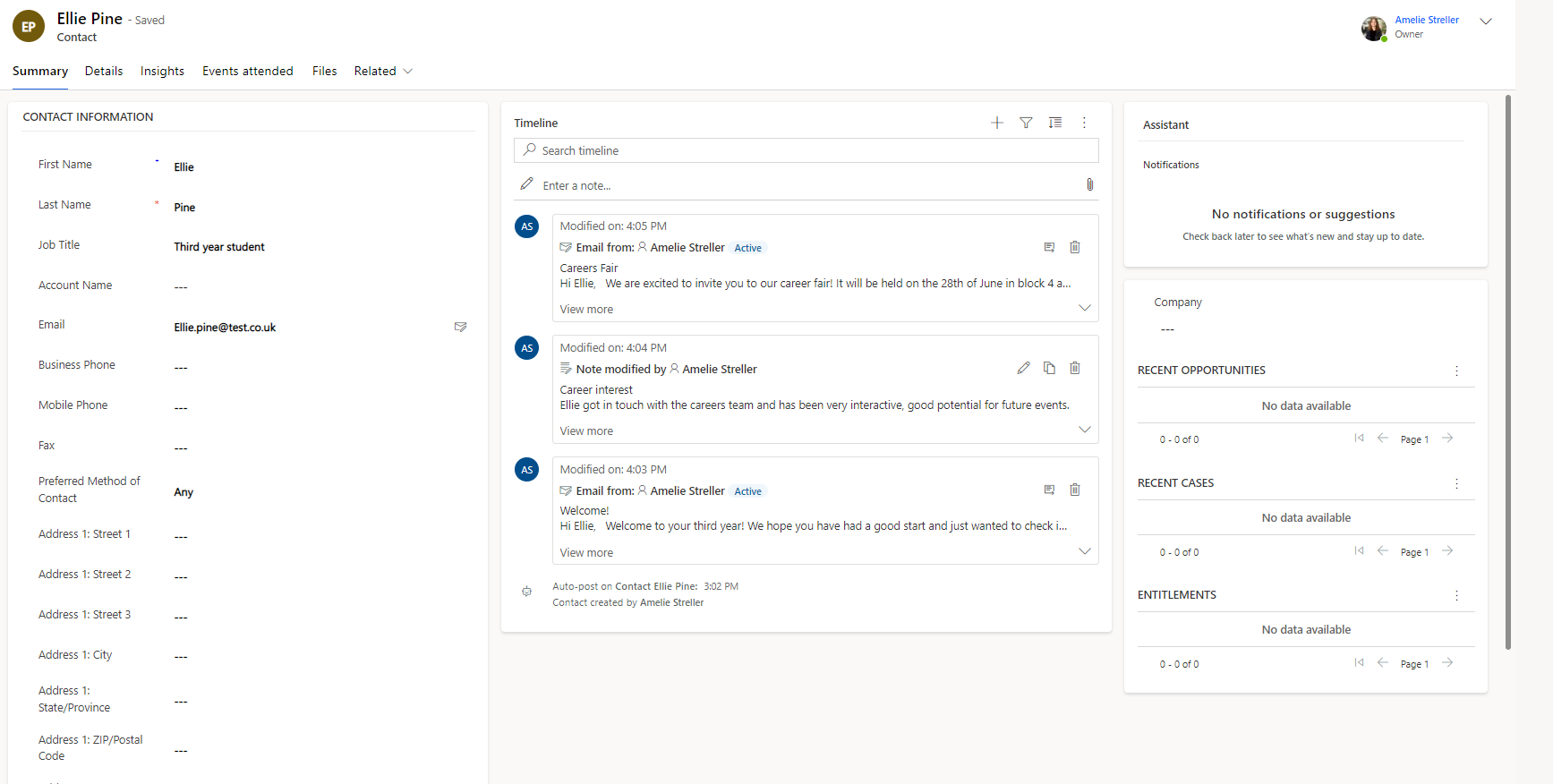
- Email Tracking: D365 Marketing integrates with Outlook and automatically tracks email correspondence and campaigns against relevant CRM records.
- Automatically generate insights: Understanding the impact that email communications are having is crucial;
- Understanding the impact of emails is crucial. Are your campaigns reaching your goals? Are people opening but not clicking links? Dynamics 365 Customer Insights analyses this data and provides intelligent, actionable insights. Using Copilot in Dynamics 365 Customer Insights offers fast AI-driven analysis and suggestions.
Customer Journeys
A customer journey is the series of steps or touchpoints someone goes through when interacting with your organisation. Interacting with your audience appropriately at each stage creates a positive experience.
People will be at different journey stages simultaneously, making manual communication management complex and time-consuming. This can be solved with the right automation.
How can customer journeys be automated?
Using Power Automate and Dynamics 365, you can automate many parts of a customer journey, reducing manual work and creating seamless experiences.
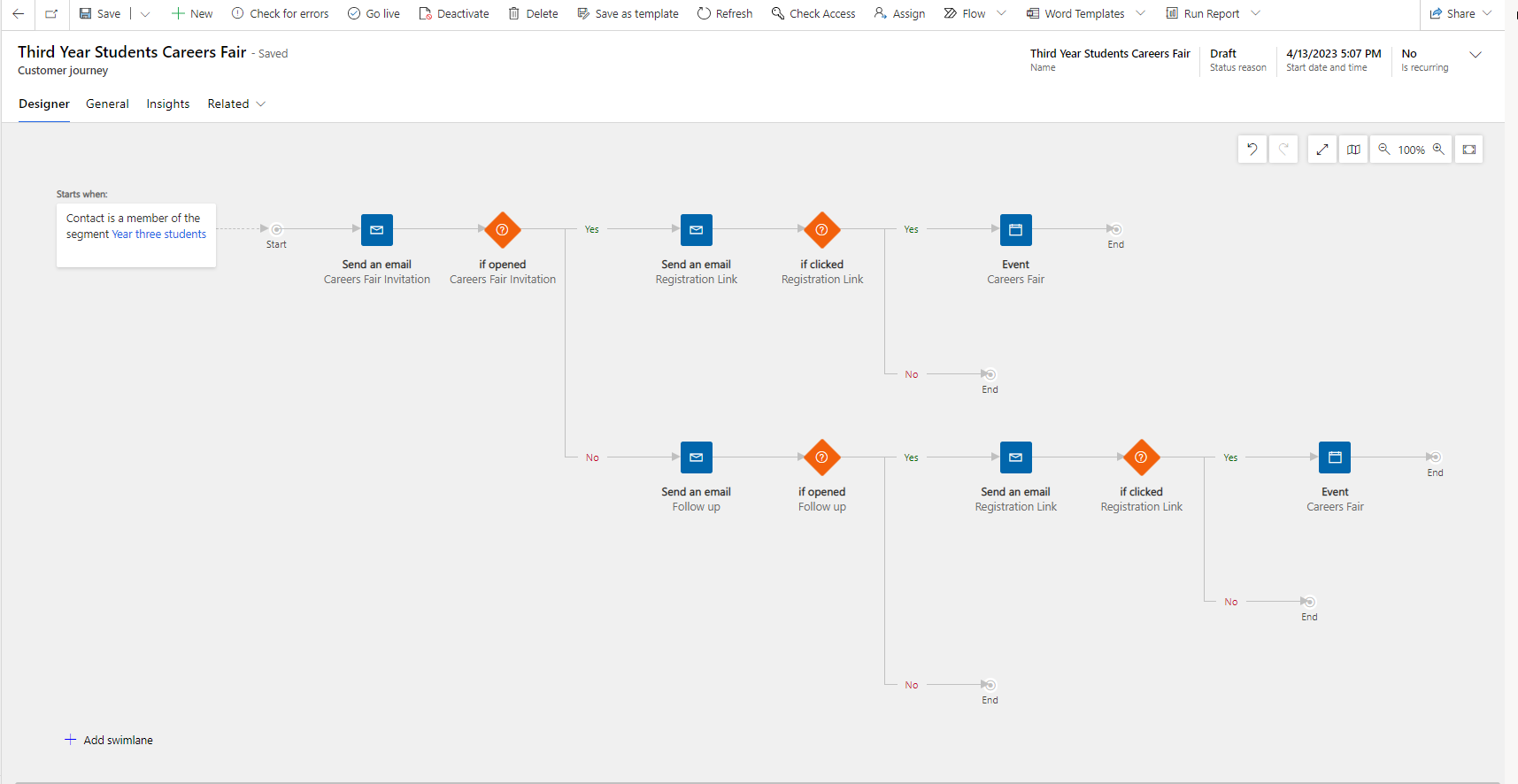
For example, for a university careers fair aimed at third-year students, a customer journey could include:
Step 1: Introductory email to all third-year students about the event
Step 2: Registration link sent to those who engaged with the first email; reminder sent to those who didn’t
Step 3: Reminder for registered students; final reminder to those who haven’t signed up
Step 4: Post-event round-up sent to attendees; participants moved to relevant segments for future events
All communications here can be automated, saving significant time and ensuring messages go out at the right moments.
Power Automate can support many processes beyond marketing, so check out our top processes you should automate using Power Automate for more ideas.
Reporting
Knowing which marketing activities perform well and which need improvement is essential. However, gathering and interpreting data manually can be challenging.
How can reporting be automated?
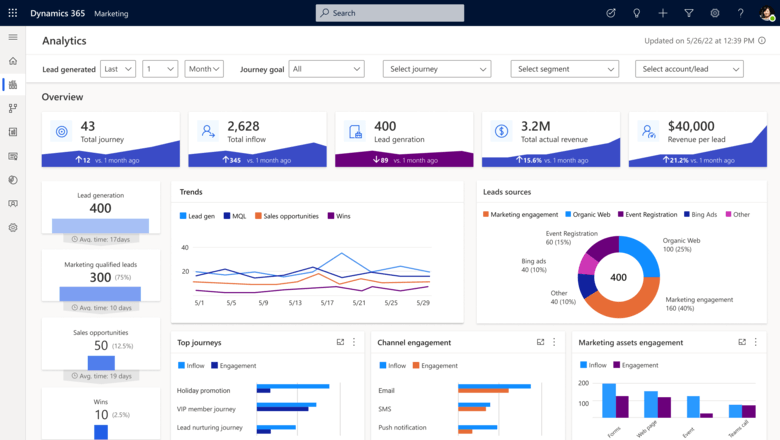
Dynamics 365 Marketing provides a holistic view of marketing efforts through easy-to-read dashboards, automatically collecting data from campaigns. This allows teams to quickly spot which campaigns succeed and which need attention without spending hours on data analysis.
For example, after launching a campaign to boost student engagement, you could have a dashboard showing key metrics like:
- How students interact with course communications
- Most and least attended courses
- Best and worst performing courses over a period
- Demographics attending most courses
Dashboards deliver fast, actionable insights, so teams can focus on making improvements rather than hunting data.
Automation offers many benefits in education, and this blog highlights just a few marketing-related examples to give you a glimpse of what’s possible.
If you want to learn more about Dynamics 365 Marketing, check out our benefits of Dynamics 365 Marketing for your organisation. For advice on implementing marketing automation in your organisation, contact us by emailing info@pragmatiq.co.uk, calling us on 01908 038110 , or filling out our contact form.
Want to keep in touch?
Sign up to our newsletter for regular updates.
"*" indicates required fields