Push Notifications Now Available in Model-Driven Apps
Push Notifications Now Available in Model-Driven Apps
February 14th, 2026
4 min read
Push notifications in model-driven Power Apps have evolved into a practical way to improve user engagement, accelerate response times, and reduce missed actions across Dynamics 365 and Dataverse environments.
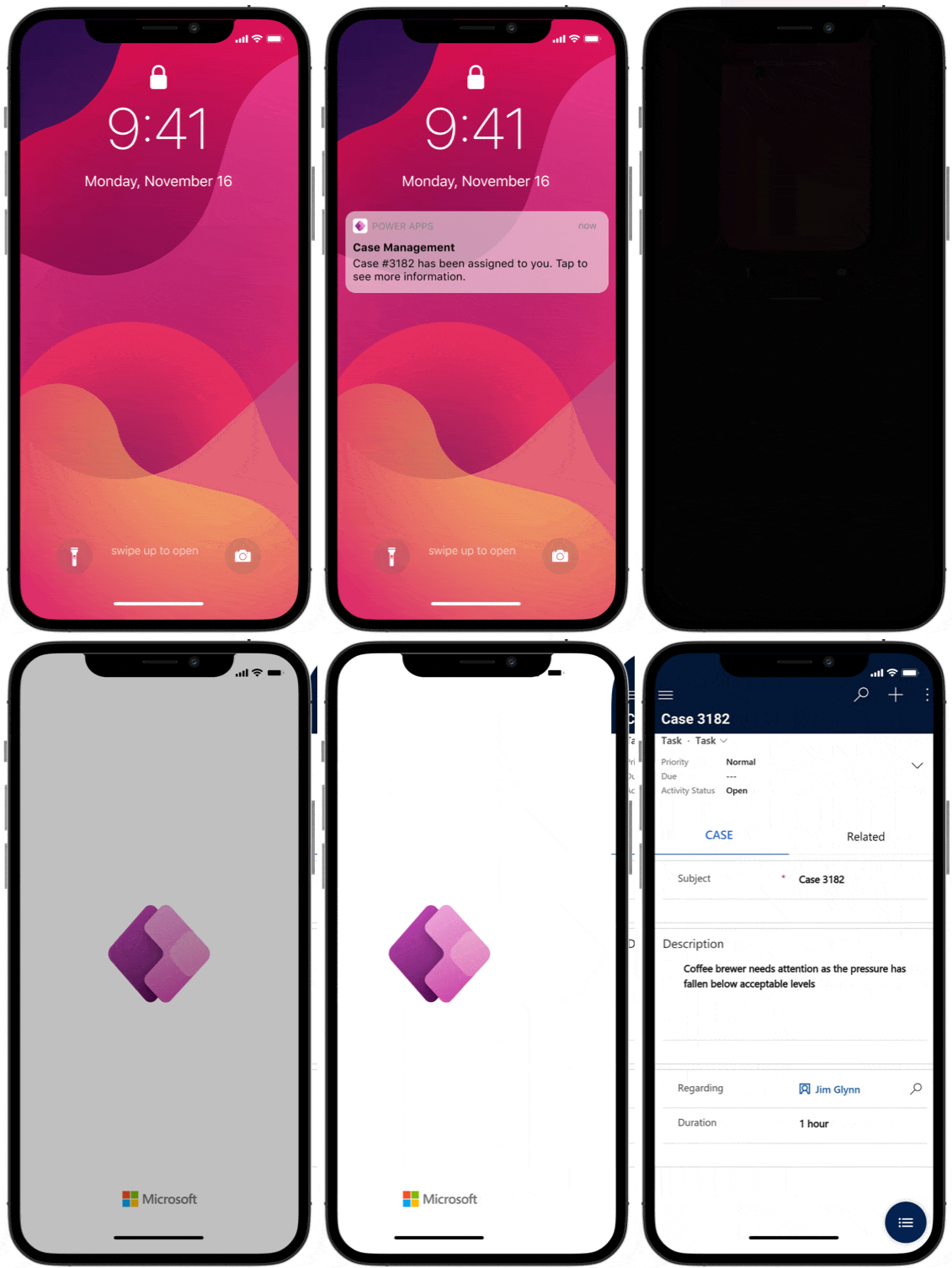
Using Microsoft Power Automate and the Power Apps Notifications connector, organisations can now trigger targeted push notifications that direct users straight to specific records, views, or forms within their model-driven app.
For businesses using Dynamics 365 or custom model-driven apps, this capability supports faster decision-making, stronger adoption, and improved operational efficiency.
Why Push Notifications Matter in Model-Driven Apps
In today’s connected environments, users expect real-time alerts – especially when working across sales, service, operations, or field-based roles.
Push notifications help organisations:
- Alert users when high-priority records are created or updated
- Prompt timely follow-up on approvals or escalations
- Notify managers of threshold breaches or exceptions
- Improve task completion rates
- Increase mobile app engagement
Rather than relying on email notifications (which are often delayed or ignored), push notifications appear directly within the Power Apps mobile experience, making them harder to miss and quicker to act upon. Want to learn more about the benefits of Power Apps, check out our blog!
How to Set Up Push Notifications in Model-Driven Apps
There are three key steps to configuring push notifications using Power Automate.
- Create a flow in Power Automate
Navigate to Power Automate and select Create.
You can start from:
- A blank automated cloud flow
- A template
- An existing solution
Choose a trigger that aligns with your business scenario.
- Selectan appropriate trigger
Power Automate supports hundreds of connectors.
For model-driven apps built on Dataverse, a common trigger is:
Dataverse – When a row is added, modified or deleted
This allows you to notify relevant users when a new record is created or updated within your environment.
Example use case:
When a new Account is created, notify the assigned Account Manager immediately via push notification.
- Add the “Send a push notification V2” action
Use the Power Apps Notifications V2 connector and select:
Send a push notification V2
You will then configure the following fields:
- Mobile app – Select Power Apps
- Your app – Choose the relevant model-driven app
- Recipient Items – Define the users (email, Azure AD user, or dynamic values)
- Message – Create your notification text
- Open app – Choose whether the app opens when tapped
- Entity – Specify the table (e.g., Account, Case, Opportunity)
- Form or View – Define where the user lands
- Record ID – If directing to a specific record
Example scenario: When a high-priority Case is created, send a push notification to the Service Manager. When tapped, the notification opens the Case form directly in the mobile app.
Modern Use Cases for Push Notifications
Push notifications are now widely used in:
Sales Teams
- New lead assignments
- Opportunity stage changes
- High-value deal alerts
Customer Service
- Escalated cases
- SLA breaches
- Complaint alerts
Operations & Field Teams
- Job status updates
- Approval requests
- Compliance reminders
Internal Approvals
- Expense submissions
- Discount approvals
- Contract sign-offs
When implemented strategically, push notifications improve system adoption and reduce delays across business processes. Discover more examples and use cases of Power Apps in our dedicated expert blog.
Mobile Experience and User Adoption
Push notifications work within the Power Apps mobile application, supporting both canvas and model-driven apps.
The modern Power Apps mobile experience provides:
- Native mobile interface
- Gesture support
- Responsive layouts
- Real-time interaction
- Seamless integration with Microsoft 365
For organisations investing in Dynamics 365 or custom model-driven apps, push notifications are a simple but effective way to enhance the mobile experience and drive engagement.
Best Practice Considerations
While push notifications are powerful, they should be implemented thoughtfully:
- Avoid over-notifying users
- Prioritise high-value scenarios
- Use clear, concise messaging
- Align notifications with defined business processes
When aligned with automation strategy, they can significantly improve response times and operational efficiency.
Looking to Enhance Your Model-Driven Apps?
Push notifications are just one way to increase engagement and streamline processes within the Microsoft Power Platform.
If you’re exploring how to improve adoption, automate workflows, or optimise your Dynamics 365 environment, our team can help.
Get in touch via our contact form, email info@pragmatiq.co.uk, or call 01908 038110 to discuss how we can support your organisation.
Want to keep in touch?
Sign up to our newsletter for regular updates.
"*" indicates required fields