

Microsoft Dynamics 365 Business Central
Streamline finance, operations, and reporting in one unified platform.

What is Microsoft Dynamics 365 Business Central?
Business Central is a modern, cloud-based ERP (Enterprise Resource Planning) platform that brings together finance, sales, operations, project accounting, and supply chain into one connected system. It manages your core day-to-day processes – from financials to order processing – while reducing manual work and giving you clear, real-time visibility across the business.
It goes beyond a traditional finance system by helping you automate processes, access data more easily, and make faster, more informed decisions. In practice, it becomes the operational backbone of your organisation, driving efficiency while providing a scalable platform that can grow and adapt as your business evolves.
What can you achieve with Business Central?
At a very high-level, Business Central helps you to:
Core functionality in Business Central
Finance
- General ledger
- Budgeting
- Cash management
- Financial reporting
- Bank reconciliation
- Asset management
- Cost accounting
Inventory / Supply
- Inventory control
- Item tracking
- Supply planning
- Demand forecasting
- Sales and inventory forecasting
- Warehouse shipments
Purchasing
- Purchase invoicing
- Purchase orders
- Return orders
- Resourcing
- Addresses
- Purchase discounts
Manufacturing
- Assembly management
- Cost worksheet
- Bill of materials
- Capacity planning
- Machine centres
- Version management
Customer Service
- Planning and dispatch
- Service contacts
- Service orders
- Service prices
Sales
- Contacts
- Sales invoices
- Sales orders
- D365 Sales integration
- Sales opportunities
- Discounting
Marketing
- Campaigns
- Email logging
- Interaction logging
- Pricing
- Sales enablement
Business Central Use Cases
Speak to a Business Central Expert today
Looking for a new ERP system or want to unlock more value from Business Central? Talk to our team about how Pragmatiq can support your business.
AI in Business Central
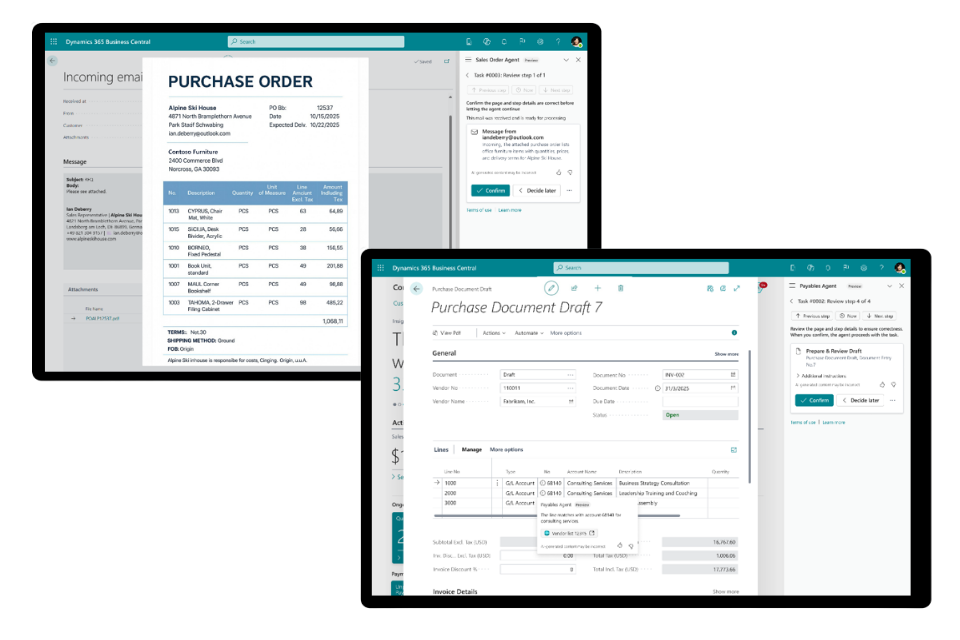
AI in Business Central helps streamline everyday processes and improve decision-making across your organisation. Built into the platform, it automates routine tasks such as reconciliations and document processing, while enabling users to interact with data more intuitively through natural language.
AI-driven capabilities, including Sales Order and Purchase agents, can manage incoming transactions, process documents, and identify anomalies – reducing manual effort and improving accuracy. Beyond this, organisations can also create custom AI agents to handle specific workflows and processes, extending automation across the business.
Business Central and the wider Microsoft Eco-System
Microsoft Dynamics 365 Business Central is part of the wider Microsoft ecosystem, providing a core platform for managing finance and operations while connecting seamlessly to the tools and systems around it.
It links naturally into the wider Microsoft stack, including Microsoft 365, Dynamics 365 applications, and the Power Platform. This means you can start with Business Central as your foundation and then extend it as your needs grow, whether that’s bringing in more advanced customer engagement, service management, or additional functionality without changing your core system.
The result is a connected environment where front-office and back-office processes work together, data flows across your organisation, and you always have a single, trusted view of your business.

Why work with Pragmatiq for Business Central?
Working with Pragmatiq means having a partner that understands both the system and the realities of running a business. We don’t just look at what the technology can do, we focus on how your processes work today and how they can be improved, using Business Central as a strong, proven foundation.
Our approach is simple and effective – prioritising out-of-the-box functionality to get you up and running quickly, without unnecessary complexity or cost. As your business grows, we introduce the right enhancements at the right time, ensuring your system evolves with you.
With a collaborative, advisory approach, we challenge where needed, guide where it matters, and deliver a reliable, scalable solution that supports your operations today and your growth tomorrow.
Speak to a Business Central Expert
Frequently asked questions
Business Central suits SMBs needing an all‑in‑one ERP; Dynamics 365 Finance is typically suited to larger or more complex organisations with advanced financial and operational requirements. BC delivers simplicity and speed; Finance delivers enterprise‑level depth.
Key differences between the platforms include:
- Target Business Size
- Complexity & Depth of Features
- Implementation Time & Ease of Use
- Cost & User Requirements
- Scalability & Global Operations
Business Central is designed for small to medium‑sized businesses that need an all‑in‑one, easy to‑use ERP to manage finance, sales, purchasing, inventory, projects, and light manufacturing. It’s best suited for small to medium-sized organisations, typically ranging from dozens to several hundred employees, depending on complexity and growth ambitions.
Business Central can be customised, but the recommended approach is to start with the standard functionality, which already covers most business needs.
If you do need to extend it, there are three main options:
- ISV apps (Independent Software Vendor) – pre-built extensions designed for specific industries or requirements, tested by Microsoft, and used by businesses globally
- Power Platform – to add flexible apps, workflows, or automation
- Custom development – for specific or unique requirements
Customisation is possible, but it’s usually the last step. The focus is on keeping your system simple, stable, and easy to scale, so you get flexibility without unnecessary complexity.
Yes, Business Central is a great option for organisations looking to move away from legacy systems. One of the main drivers for change is the growing number of manual workarounds, disconnected systems, and limited reporting that older platforms tend to create over time.
By moving to Business Central, you bring everything into a single, cloud-based system with built-in finance, operations, and reporting. This removes data silos, improves visibility, and reduces the reliance on manual processes that slow teams down.
Because it’s built on Microsoft’s cloud platform, you also benefit from regular updates, improved security, and the ability to scale as your business grows—without the burden of maintaining outdated infrastructure.
In short, it helps you move from a workaround-heavy, disconnected setup to a more streamlined, modern way of working.
This depends on your requirements, but implementations can be delivered quickly when starting with standard functionality, with additional phases rolled out over time.
An ERP (Enterprise Resource Planning) system is software that helps you manage your entire business in one place.
Instead of using separate tools for finance, sales, inventory, and operations, an ERP brings everything together into a single, connected system. This means all your data is stored in one place, giving you a clear, real-time view of how your business is performing.
In simple terms, an ERP system helps you streamline processes, reduce manual work, and make better decisions as your business grows.
Yes, Business Central is the modern, cloud-based evolution of Dynamics NAV, so it’s a natural next step for businesses already using it.
The core structure will feel familiar, but Business Central brings significant improvements, including a modern user experience, cloud deployment, regular updates, and stronger integration with the wider Microsoft ecosystem.
Moving from NAV also helps address common challenges such as upgrade complexity, reliance on customisations, and maintaining on-premise infrastructure. By transitioning to Business Central, you benefit from a more flexible, scalable platform that’s easier to manage and designed to grow with your business.
Getting the most from Business Central is about more than just implementing the system, it’s about having the right support in place as your business evolves.
The best approach is to start with a strong, standard setup, using out‑of‑the‑box functionality, and then build on it over time. This keeps things simple, cost-effective, and easy to scale.
With Pragmatiq’s Managed Services, you have ongoing support to help you optimise and evolve your solution – whether that’s refining processes, introducing new functionality, or making better use of the wider Microsoft ecosystem.
In short, Business Central becomes a platform you can continuously improve, with the right guidance to ensure it keeps delivering value as your business grows.
