

Name update to Microsoft Copilot Studio
Name update to Microsoft Copilot Studio
September 11th, 2025
3 min read
Microsoft has announced a naming update to Copilot Studio to bring greater clarity to the different experiences available across Microsoft 365 and the standalone application.
Copilot Studio is a powerful platform for building secure, scalable, and intelligent AI agents that work seamlessly across Microsoft 365 and line-of-business systems. With this update, Microsoft aims to help users better understand the capabilities and use cases of each experience.
What’s changing?
Previously, Copilot Studio existed in two ways:
- Agent Builder – Embedded within Microsoft 365 Copilot
- Copilot Studio – A standalone web experience
Going forward, these will be referred to as:
- Copilot Studio “Lite” – The embedded experience within Microsoft 365 Copilot, designed for information workers.
- Copilot Studio “Full” – The standalone Copilot Studio web experience, designed for advanced makers and developers.
How to decide which approach is right for you?
Copilot Studio “Lite” Experience (formerly Agent Builder)
- Ideal if you want to quickly create agents using natural language and existing content (e.g. a bot that answers questions from your team’s SharePoint files or emails)
- No coding required – build directly within the Microsoft 365 Copilot app
- Ideal for personal use or small teams
Copilot Studio “Full” Experience
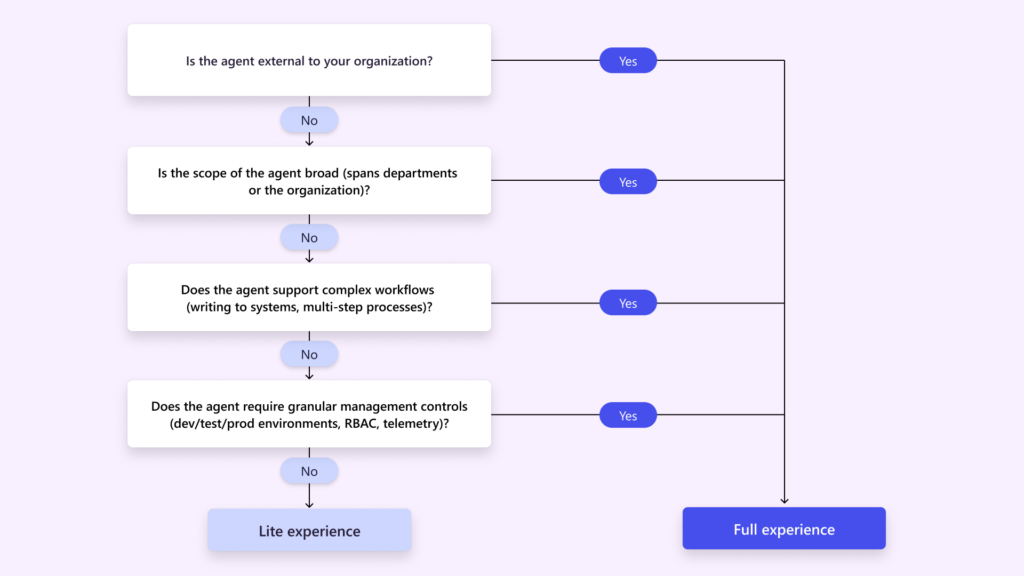
- Designed for broader deployment across departments, organisations, or external audiences
- A standalone web experience with a rich set of tools for complex or scalable solutions
- Supports advanced features like multi-step workflows, custom integrations, and lifecycle management
- Managed via the Power Platform Admin Center for enterprise-grade governance
Microsoft has also provided a helpful decision tree to guide users in selecting the right experience for their needs:
How will licensing be impacted?
- Both experiences are accessible with a Microsoft 365 Copilot license for authenticated users.
- If you don’t have a Copilot license, you can still access either experience using Copilot Credits.
For full details on the experiences and licensing, visit the official Microsoft documentation.
How can Pragmatiq help?
At Pragmatiq, we support organisations with Copilot Studio (full experience), working with organisations to embed an AI strategy safely and seamlessly.
Our Launchpad Package includes all you need to launch a successful Microsoft Copilot Studio strategy. Covering three key steps (Educate, Inform & Inspire), this package offers comprehensive support to help you integrate Copilot Studio smoothly and effectively within your organisation.
If you have any questions about the naming updates detailed in this article, or if you would like to learn more about our Copilot Studio Launchpad, please contact us by emailing info@pragmatiq.co.uk or calling 01908 038110.
Want to keep in touch?
Sign up to our newsletter for regular updates.
"*" indicates required fields